

How to Repost Instagram Posts in Minutes
In the fast-paced world of social media, knowing how to repost Instagram posts in minutes can be a game changer. Whether you are sharing content from friends, promoting a brand, or curating a feed that reflects your interests, reposting is an essential skill for anyone looking to maximize their Instagram presence. In this article, we will explore various methods to repost, tools to make the process easier, and best practices to ensure your reposts are effective and respectful.
Understanding the Importance of Reposting
Reposting is not just a way to share content; it is an opportunity to engage with your audience and showcase the work of others that resonate with you. By reposting, you can:
- Build Community: Sharing others’ content helps foster a sense of community on Instagram. It shows that you value the contributions of your peers.
- Provide Fresh Content: Reposting allows you to continually update your Instagram feed, providing your followers with fresh perspectives without the need to create original content all the time.
- Show Appreciation: When you repost someone’s work, it’s a way to acknowledge and appreciate their creativity or message.
How to Repost Instagram Posts in Minutes
Reposting Instagram content can be accomplished in several ways, depending on whether you are using the Instagram app itself or third-party tools. Let’s break down the most popular methods:
1. Screenshot Method
The most straightforward method for reposting is to take a screenshot. Follow these steps:
- Navigate to the post you want to share.
- Take a screenshot of the post.
- Edit the screenshot to crop out any unwanted elements.
- Upload the edited image to your Instagram account.
- Don’t forget to credit the original poster in your caption!
2. Copy Link Method
If you prefer not to use screenshots, you can repost by copying the post link:
- Tap the three dots on the top right corner of the post.
- Select “Copy Link.”
- Use third-party apps that allow reposting from links (explained below).
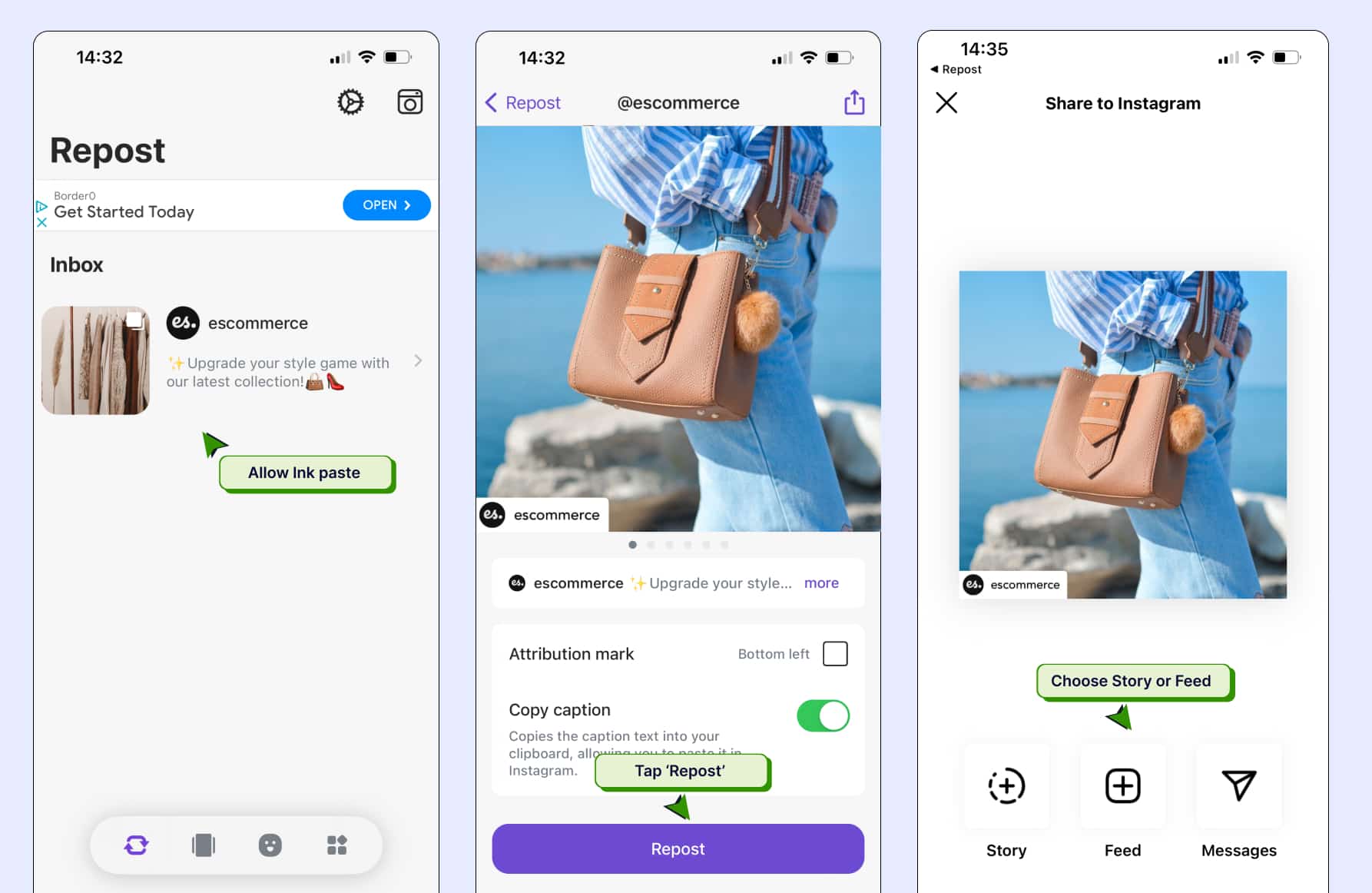
3. Third-Party Reposting Apps
To repost Instagram posts efficiently while maintaining the original formatting, you can use various third-party apps. Some popular options include:

- Repost for Instagram: This app lets you repost posts easily. You can maintain the original caption and add attribution automatically.
- InstaRepost: Another user-friendly option that lets you repost images and videos with ease.
- Regrammer: This app is particularly popular for reposting videos and images with just a few taps.
Best Practices for Reposting
While reposting can enhance your Instagram presence, it’s essential to do it right. Here are some best practices to keep in mind:
- Always Give Credit: When reposting someone else’s content, make sure to credit them in your caption or use their watermark if available.
- Ask for Permission: If you have a close relationship with the original poster, consider asking them for permission before reposting their work.
- Add Your Voice: Rather than just reposting, add your thoughts or commentary to engage your audience further and share your unique perspective.
- Keep Your Feed Cohesive: Ensure that reposted content fits the overall aesthetic and message of your Instagram feed to maintain consistency.
Common Mistakes to Avoid
Even with best intentions, people make mistakes when reposting. Here are some common pitfalls to avoid:
- Neglecting to Credit: Failing to give credit to the original poster is one of the most significant faux pas on social media.
- Using Copyrighted Material: Be mindful of reposting content that may have copyright claims attached, such as music videos or professional photographs.
- Cluttering Your Feed: While reposting can add value, avoid bombarding your followers with too much reposted content that may dilute your original posts.
Conclusion
Reposting Instagram posts can enhance your social media strategy significantly. It allows you to engage with your audience, share valuable content, and build your online community. By following the methods outlined above and adhering to best practices, you can repost with confidence and finesse. Remember, the key to effective reposting is providing value and maintaining integrity. So go ahead, practice how to repost Instagram posts in minutes, and watch your account thrive!